
By NakodaX Engineering team
NakodaX ·

NakodaX blog/Source Protection·7 min read
How NakodaX finds the code worth protecting, gives developers stand ins to build against, ships a protected release and decrypts the code only in memory.
By NakodaX Engineering team
NakodaX ·
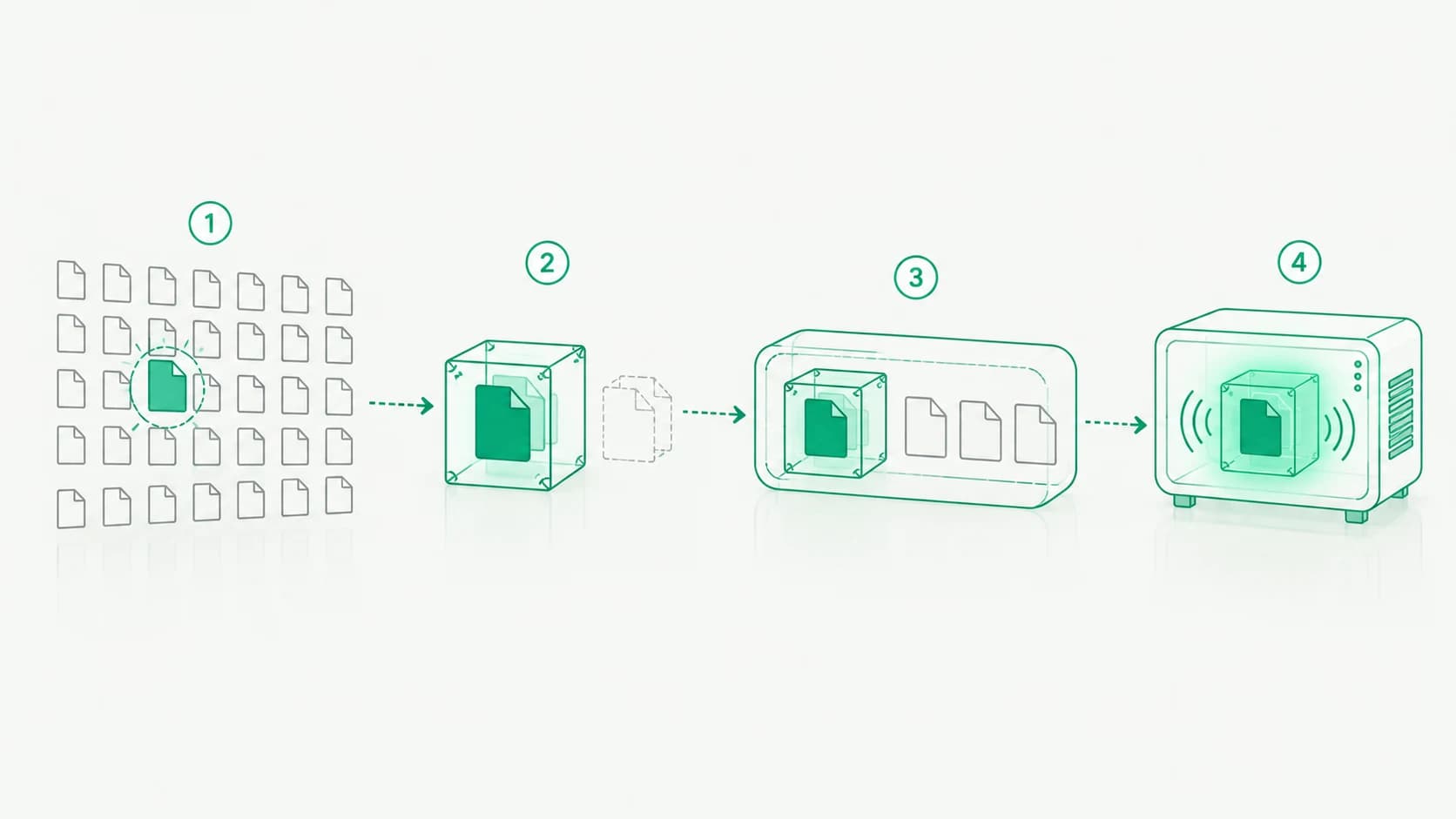
Protect the files that hold your business logic, leave the rest open, and let developers build against stand ins.
Some companies sell software that customers install and run on their own servers. Each install holds a full, readable copy of the source code. When the contract ends, the software usually keeps running.
Most of that code is not the reason customers pay. Routing, login, logging, configuration, forms and database access look much the same in every product. A small part is different. Every business has its secret sauce: the proprietary business logic, such as pricing rules, a scoring model or matching logic.
This post explains how Source Protection handles that part, step by step. It covers how we find it, how developers keep working without it, how it is tested and released, and what happens when it runs.
Source Protection starts with Analyze. It reads the repository and ranks each file by how much custom logic it holds. It looks at how many decisions a file makes, how unusual its names and algorithms are, and how much of the rest of the code depends on it. Generated files, vendored libraries, tooling folders and common boilerplate are ranked low or skipped.
The ranking follows a fixed set of rules. It does not use AI, and the same repository gives the same result every time.
The result is a protection map: a suggested list of files. Your team reviews it, adds what is missing and removes what should stay open. Nothing is protected until someone on your team approves the map.
For a large repository with many services, you choose which folders to analyze. Today this works for Python, JavaScript, TypeScript and SQL. Other languages are planned.
Keep the list short. Protect the files that hold the business decisions, and leave the helper code around them open.
Once the map is approved, NakodaX encrypts the chosen files and publishes a protected copy to a target repository on GitHub, GitLab or Bitbucket. Your original repository is not changed.
The protected copy keeps the same structure. The chosen files are replaced by encrypted versions, and everything else is ordinary code. If someone copies the whole repository, the protected files cannot be read without a key.
To do this, a NakodaX worker makes a temporary copy of your repository, analyzes it and publishes the protected release. After that, the protected code is never readable on NakodaX. NakodaX keeps the keys and licenses, not your code.
Each repository has its own key. If one key leaks, it reaches one repository, not your whole codebase.
If the pricing code is protected, how does a developer work on the checkout page that calls it?
Most developers do not need the real pricing code. They need something with the same shape. So each protected file comes with a stand in, also called a mock. It has the same interface as the real file, with the function bodies replaced by placeholders. NakodaX creates the stand ins when it publishes the release.
Contributors, vendors and contractors get a developer license. That license opens the stand ins, never the real code. On every key request, NakodaX decides whether a machine gets the real code or the stand in, so the choice is not left to the machine itself.
When the placeholders are not enough, a contributor can unlock a stand in, change it and seal it again.
In day to day work, developers test the rest of the app against the stand ins. It works the same way as mocking a payment provider or any other outside service.
Sometimes a developer does need to change the real protected code. That happens in a change session: a time limited window to edit protected code on a branch, with a record of everything done in it.
A developer requests the session. A different person on your team approves it after entering their password again. Nobody can approve their own request. The approver also sets how many machines the session covers.
Inside the session, the developer unlocks the files, edits them, tests them against the real code and seals them again. NakodaX refuses to seal if an unlocked file is staged in git, so readable code does not slip into a commit. When the session closes, the extra access ends.
Python, JavaScript and TypeScript that load at run time need no extra build step. The protected release is what you ship.
Projects that are bundled or compiled add two steps to the build pipeline. The first makes the protected files readable for the build. Your own compiler or bundler then runs as usual. The second encrypts them again, so the shipped build contains only encrypted files. Treat the second step as required: skipping it ships readable code.
The customer installs the NakodaX runtime SDK for Python or Node and starts the app the usual way, through an import hook or the NakodaX launcher. It runs where your software already runs: Kubernetes, ECS, Railway, plain servers and edge boxes, as long as they can reach NakodaX.
The customer does not need access to your NakodaX account. A Connect page gives you the steps, a key and a registration token to hand over.
When the app imports a protected file, the runtime asks NakodaX for the key. With a valid license, it gets the key and decrypts the file in memory. Nothing readable is written to disk, so there is no readable copy in the install folder, in temporary files or in a backup.
There is no license check for someone to remove. The key is what decrypts the code. Without it, the protected files are encrypted data and nothing else.
If the license is missing, expired or revoked, does not cover the repository, or the runtime cannot reach NakodaX, the real code does not run. There is no weaker fallback.
If the software has to run without internet access, NakodaX can be installed on your own servers, including offline and air gapped networks. Keys and licenses then never leave that environment.
A license belongs to one customer, team or developer. It can have an end date and a limit on how many deployments run at the same time.
You can suspend a license and resume it later, revoke it for good or rotate its key. Changes take effect at the deployment's next key request, not instantly. A process that is already running keeps working until its cache refreshes, which can take hours.
Every key request, license change and change session is recorded. You can see which deployments are running and when each one last checked in.
While the software runs on a licensed machine, the protected code is readable in that machine's memory. Someone with full control of that machine could study it. Source Protection does not claim to stop that.
What it does is keep the protected code out of every copy at rest, such as a copied repository, a backup or an old install, and stop it from running when a license ends. It cannot recover logic that someone has already copied or learned.
The key opens the code. Without a license, a copied repository is only encrypted data.
Related product
Let vendors and customers build or run software without receiving selected proprietary source code in readable form.
See how it worksReal situations, and the video where there is one, on the same problem.
Video
When software has to run in a customer or vendor environment, see how NakodaX keeps selected proprietary components out of the readable release.
Watch (3:29)Situation
You installed a 60 day pilot on a prospect’s servers. The deal stalled. A year later, they are still using it, and they have a full copy of your code.
Read moreSituation
A prime contractor brings in subcontractors, and they bring in their own. By the third level, your code is on machines you have never heard of.
Read more
New to NakodaX? Watch the overview
A full walkthrough of how NakodaX helps a business keep control of documents, business data and source code after they are shared, moved or deployed.
Watch the video (8:49)
Source Protection · 3 min read
When an outsourced team finishes the contract, your source code goes with them. Here is what source code protection for outsourced development looks like.
August 20, 2026

Source Protection · 2 min read
Most of a repository is replaceable. A small part is not. Start by protecting the modules that carry the business logic.
September 16, 2026

Source Protection · 2 min read
Technical due diligence means sharing source code with a company that may not buy you. Review need not leave an ordinary working copy behind.
September 18, 2026