Language
Status
How it runs
When

NakodaX Source Protection
Lock the parts of your code that make your product yours. Your customers run it as normal. When the contract ends, you switch it off.

Why it matters
You ship it
They wanted it on their servers.
When your customer runs your software on their own serversThe trial ends
Nothing switches it off.
When a free pilot keeps running on the customer’s serversThe engagement ends
The contract ended. Their copy, and what they know, did not.
When the agency that built your product keeps a copyHow it works
Connect your repository. We suggest what to lock. You decide.
We create a protected copy for your customer or vendor.
They run it on their servers, the usual way.
Set an end date, see every deployment, switch anyone off.
Features
Lock what matters, run it at your customers, and keep your own team moving.
Pick what to protect
Find the crown jewels
Point us at a repository. We rank the files by how much only you could have written, and suggest what to lock. You review the list.
Learn more: We find the code worth protecting.Protect and publish
Your repository stays exactly as it is. We publish a protected copy for your customer or vendor, on the branches you pick.
Learn more: A protected copy, ready to ship.Pick the repository and the branches. Nothing changes for your team.
Ship to customers
Runs at the customer
The customer deploys as normal. The locked parts open for the running software and nowhere else.
Learn more: Runs on their servers. Readable only while it runs.One switch per customer
Give a pilot an end date, pause a late payer, or cut off a contract that ended. Every customer has their own key.
Learn more: End one customer. Nobody else notices.Each repository opens with its own key, so your codebase stays closed.
Keep your team moving
Stand ins
Developers, agencies and contractors get working stand ins. They build and test. The real code stays locked.
Learn more: Let people build without letting them read.Approved changes
Someone asks, a second admin approves, the window has an end. When the work is done, the code locks again.
Learn more: Changes to the crown jewels need a second pair of eyes.A customer's own build can run, and what ships is locked again.
Prove it
Every deployment
See each customer's deployments and when they last checked in. Every key and licence change is on record.
Learn more: Know where your software is running.Customer handover
The steps, the key and the setup details in one place. Email the key from your dashboard.
Admins, members and viewers. Showing a key again needs your password.
Use cases

Say yes to the customer who wants it in their own data centre.
When your customer runs your software on their own serversMore stories: Software companies
A trial that ends when you say.
When a free pilot keeps running on the customer’s serversMore stories: Software companies
Outsource the build and keep the crown jewels.
When the agency that built your product keeps a copyMore stories: Software companies
A departing engineer leaves with nothing to take.
When a developer leaves with a copy of your codeMore stories: Employee and partner offboarding
Let a partner sell and run it. You hold the off switch.
A reseller who becomes a competitorMore stories: Software companies
Deploy inside their walls, with a record of every start.
More stories: Finance and insuranceHow it is different
Hiding the code makes it harder to read. A contract is a promise. NakodaX gives you a switch, and your customers still run it on their own servers.
Integrations
Security
The protected parts are encrypted with AES-256.
Each repository opens with its own key, so your codebase stays closed.
Nothing readable is left on their disk.
Every key request and licence change is logged.
Security documentation is available on request. NakodaX holds the keys and the licences. Your repository stays with you.
AI Protection
Your selected components stay out of the readable release, so there is nothing to paste.
See what AI Protection coversLanguages
Python, JavaScript, TypeScript and SQL today. Tell us what you build with, and it shapes what we add next.
Tell us what you build with. It decides what we add next.
Developer tools
nkx is a small command line tool. It drops into your build and into the way your developers already work.
In your build
nkx materializenkx rehookTwo commands around the build step you already run. What you ship is locked again.
In your team
nkx unlocknkx resealA developer opens the protected code inside an approved change session, then seals it when done.
Blog
Source Protection · 7 min read
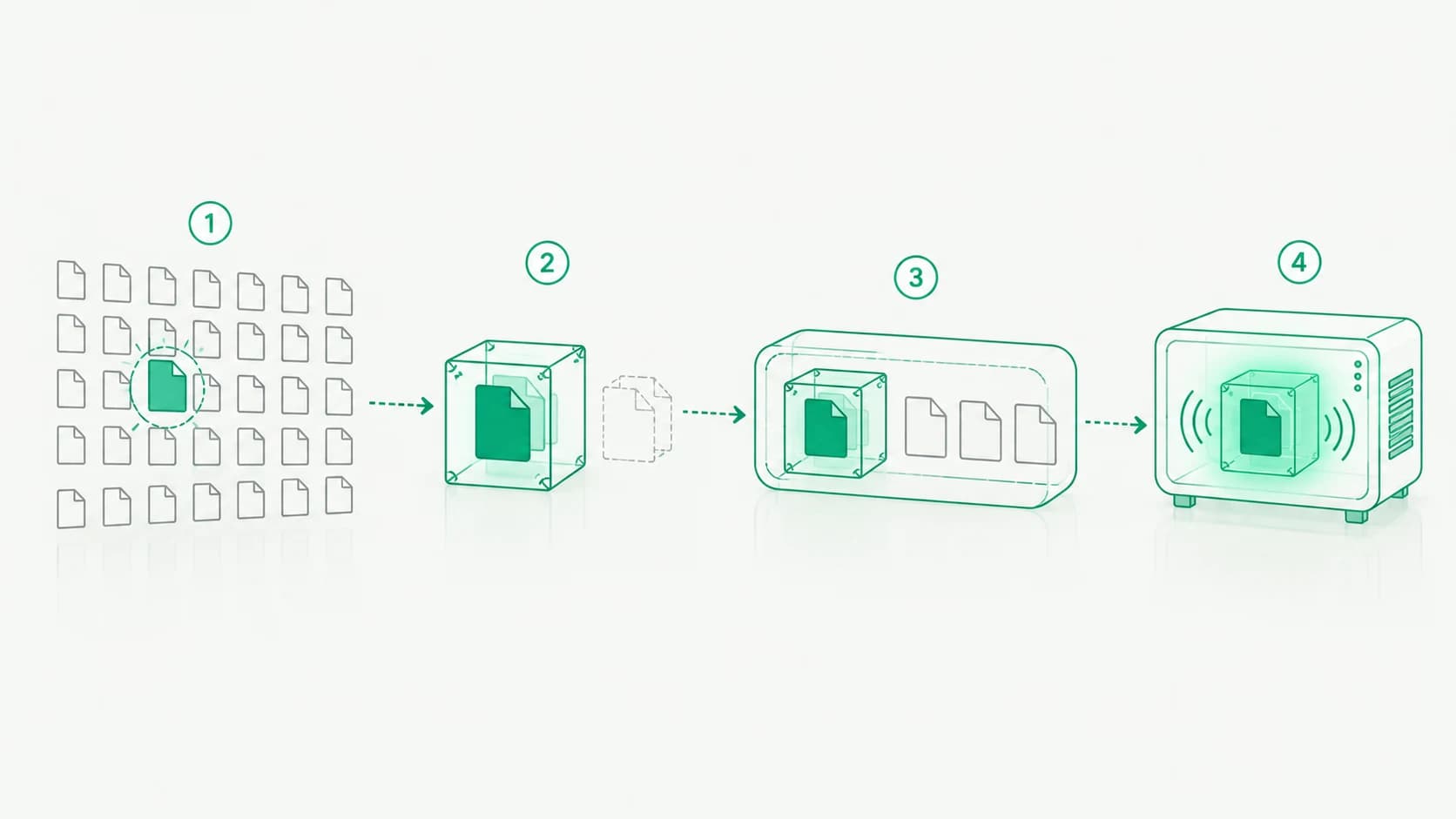
How NakodaX finds the code worth protecting, gives developers stand ins to build against, ships a protected release and decrypts the code only in memory.
October 13, 2026

Source Protection · 3 min read
You licensed code to a customer for a fixed term. The term ended and the code kept running. This is software IP protection: a license the code enforces itself.
August 26, 2026

Source Protection · 2 min read
Most of a repository is replaceable. A small part is not. Start by protecting the modules that carry the business logic.
September 16, 2026
Answers
5 topics, 22 answers. Open a topic to see its questions.
Try Source Protection free, or tell us what you deploy and where it needs to run and we will show you how it would work.
Situations and articles on what happens when work leaves your hands, and what changes.
Situation
Big customers want your software inside their own environment. That means handing them a full, working copy of your code, and you have no way to switch it off when the contract ends.
Read moreBlog
How NakodaX finds the code worth protecting, gives developers stand ins to build against, ships a protected release and decrypts the code only in memory.
Read moreSituation
Defense and government systems are built by integrators, subcontractors and rotating staff. Each of them ends up holding a copy of code that should never leave the building.
Read more